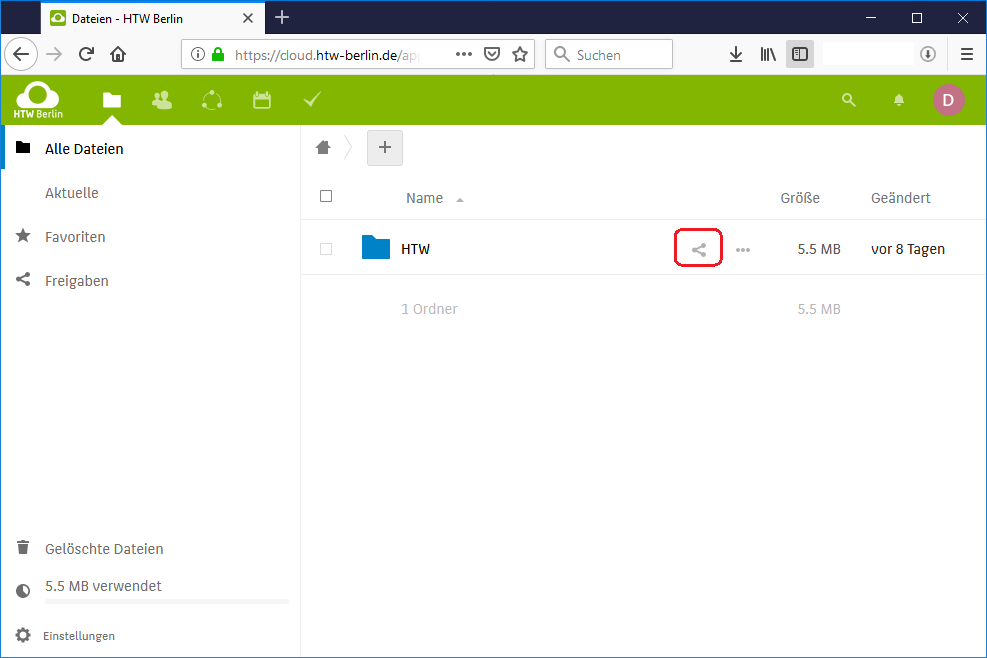
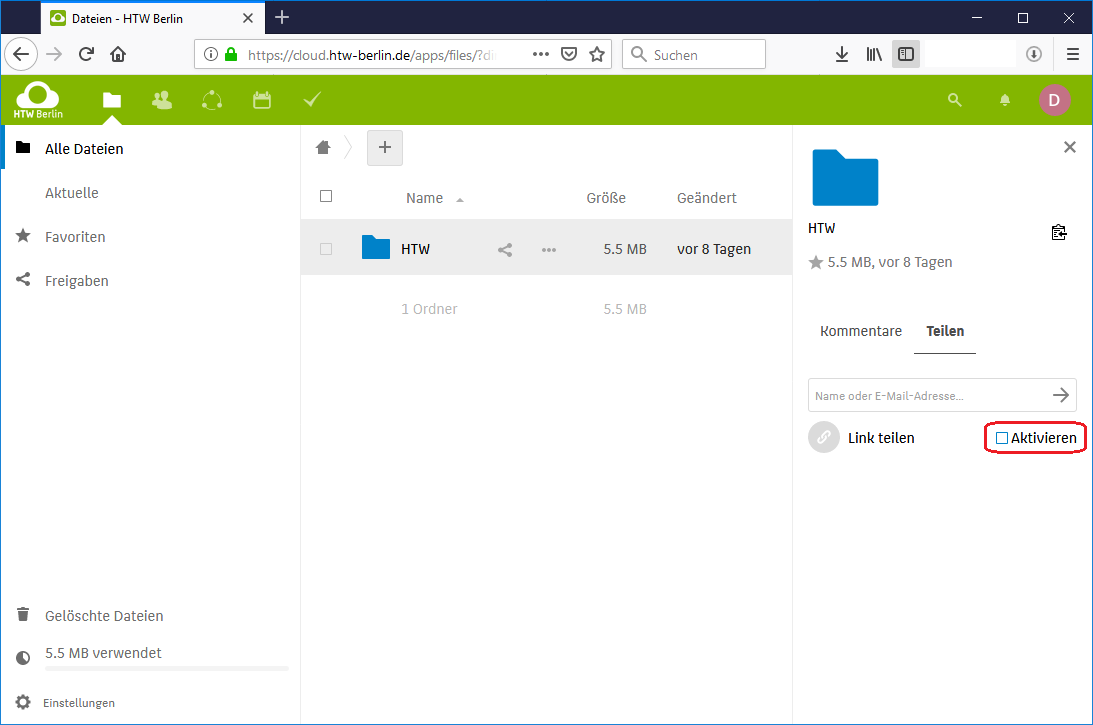
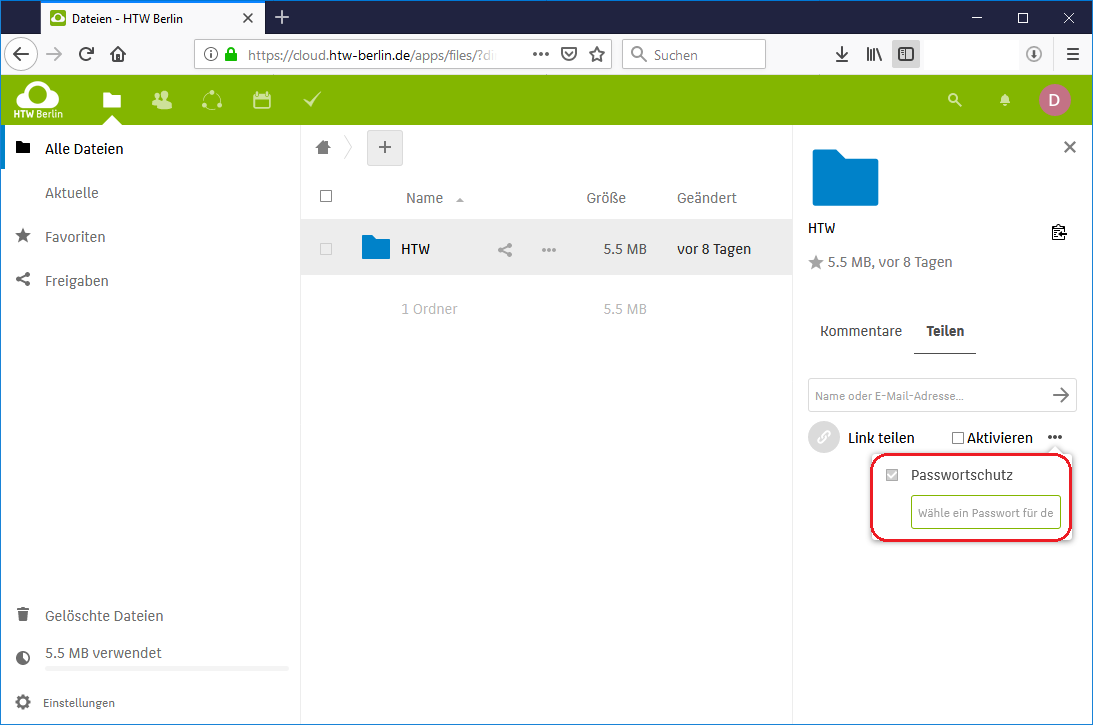
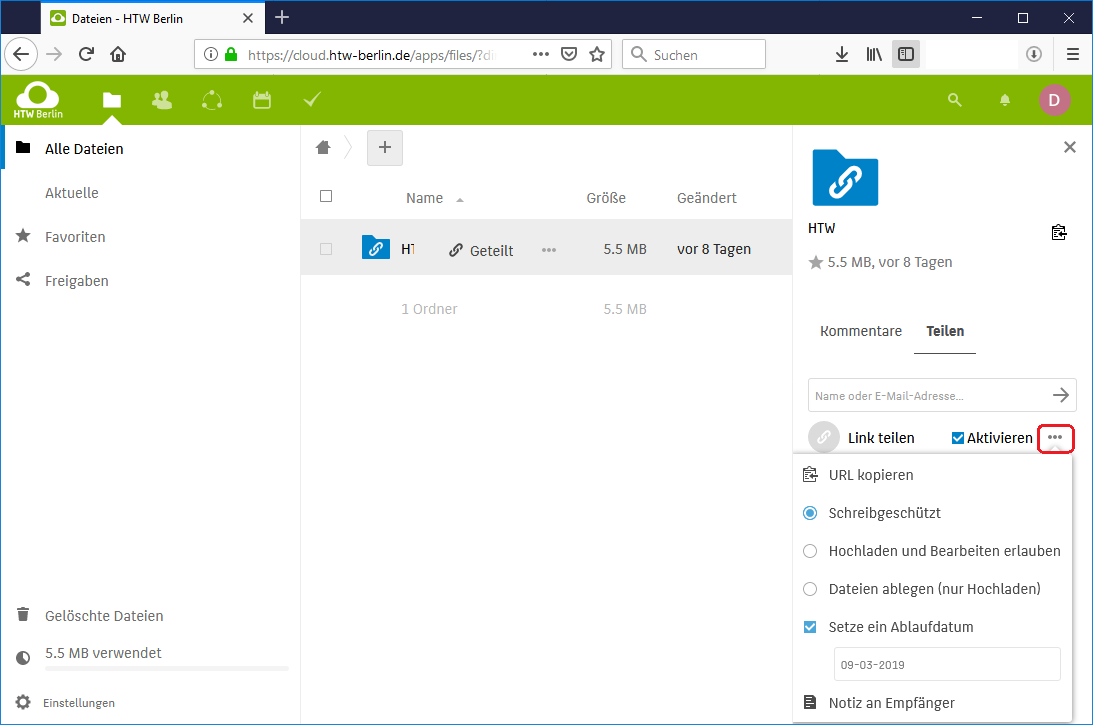
TutorialsWLAN /Wi-FiWindowsInitial setup WindowsRenew certificate WindowsAndroidInitial setup Androidrenew certificate AndroidiOSIntial setup iOSRenew certificate iOSmacOSmacOS 12 (und older)macOS 13 (and newer)LinuxFree WiFi BerlinHTW-AccountE-MailRetrieving your e-mails via the web browserManage folders in webmailerSearch your emails for keywordsYour address book in the webmailerUsing an e-mail programMozilla ThunderbirdMicrosoft OutlookWindows MailMac OS X MailMail for iOS 11 and newerAndroid (5.1 or higher)Customize e-mail addressAbsence noteForwardingInformation about spamDetermine original senderFrequently asked questionsVPNConfigure VPN Connection on Windows (OpenVPN)Configure VPN Connection on iOS (OpenVPN)Configure VPN Connection on Android (OpenVPN)Configure VPN Connection on macOS (OpenVPN)Configure VPN Connection on Linux (OpenVPN)Multi-factor authenticationCloudAccess to the HTW CloudAccess via web browserAccess via appAccess via software clientZugriff per Netzlaufwerk (Webdav) einbindenShareInternal shareExternal shareShare via a linkHorizonStorage spaceHTW-SpaceAccess on Windows 10macOSAccess on UbuntuCampus Management LSFGeneral operating instructionsSearch functionsLecture schedulesCourse catalogueEventsFrequently asked questionsLSF for studentsOnline booking of courses with LSFYour personal timetableExamsMore functionsFrequently asked questionsLSF for teachersNotes on occupancyGrade ManagementInformation and requirementsSend email to studentsConnect LSF calendar with external calendarsFrequently asked questionsEditing of module descriptionsCopying and printing at the HTW BerlinStudents and External UsersCopying at the DevicePrinting via myPrint and Public PCsPrinting/Scanning via USB StorageScan to EmailEmployees and LecturersLink Card with HTW AccountCopying at the DevicePrinting via the Inepro Enhanced Print ClientPrinting/Scanning via USB StorageScan to EmailPrice ListPublic copiersNetwork / LANWindows 10Windows 11macOSLinuxNetzwerkgeräte registrierenCentral Learning Platform MoodleAccess to MoodleGeneral InformationMoodle Video TutorialsExternal servicesZenkit TutorialsWLAN /Wi-FiWindowsInitial setup WindowsRenew certificate WindowsAndroidInitial setup Androidrenew certificate AndroidiOSIntial setup iOSRenew certificate iOSmacOSmacOS 12 (und older)macOS 13 (and newer)LinuxFree WiFi BerlinHTW-AccountE-MailRetrieving your e-mails via the web browserManage folders in webmailerSearch your emails for keywordsYour address book in the webmailerUsing an e-mail programMozilla ThunderbirdMicrosoft OutlookWindows MailMac OS X MailMail for iOS 11 and newerAndroid (5.1 or higher)Customize e-mail addressAbsence noteForwardingInformation about spamDetermine original senderFrequently asked questionsVPNConfigure VPN Connection on Windows (OpenVPN)Configure VPN Connection on iOS (OpenVPN)Configure VPN Connection on Android (OpenVPN)Configure VPN Connection on macOS (OpenVPN)Configure VPN Connection on Linux (OpenVPN)Multi-factor authenticationCloudAccess to the HTW CloudAccess via web browserAccess via appAccess via software clientZugriff per Netzlaufwerk (Webdav) einbindenShareInternal shareExternal shareShare via a linkHorizonStorage spaceHTW-SpaceAccess on Windows 10macOSAccess on UbuntuCampus Management LSFGeneral operating instructionsSearch functionsLecture schedulesCourse catalogueEventsFrequently asked questionsLSF for studentsOnline booking of courses with LSFYour personal timetableExamsMore functionsFrequently asked questionsLSF for teachersNotes on occupancyGrade ManagementInformation and requirementsSend email to studentsConnect LSF calendar with external calendarsFrequently asked questionsEditing of module descriptionsCopying and printing at the HTW BerlinStudents and External UsersCopying at the DevicePrinting via myPrint and Public PCsPrinting/Scanning via USB StorageScan to EmailEmployees and LecturersLink Card with HTW AccountCopying at the DevicePrinting via the Inepro Enhanced Print ClientPrinting/Scanning via USB StorageScan to EmailPrice ListPublic copiersNetwork / LANWindows 10Windows 11macOSLinuxNetzwerkgeräte registrierenCentral Learning Platform MoodleAccess to MoodleGeneral InformationMoodle Video TutorialsExternal servicesZenkit HTW Berlin Information Technology Centre Tutorials Cloud Share Share via a link Share via a link This instruction explains how to share folders or files using a link (URL). The sharing requires password protection. In addition to this option, you can also share using external e-mail addresses. Step 1: Click on the share icon Click on the share icon next to a folder or file. Step 2: Activate share link You can use the "Activate" function to make the share link available. Step 3: Set password You will be prompted to set a password for the share after enabling the share. Enter the desired password and confirm with Enter. Step 4: Share options and link Using the three dots "..." you can copy the URL for the release, set permissions and e.g. the expiration date (default is one month).
Share via a link This instruction explains how to share folders or files using a link (URL). The sharing requires password protection. In addition to this option, you can also share using external e-mail addresses. Step 1: Click on the share icon Click on the share icon next to a folder or file. Step 2: Activate share link You can use the "Activate" function to make the share link available. Step 3: Set password You will be prompted to set a password for the share after enabling the share. Enter the desired password and confirm with Enter. Step 4: Share options and link Using the three dots "..." you can copy the URL for the release, set permissions and e.g. the expiration date (default is one month).